pgvector explained simply, part 1: how to teach a database to understand meaning
A database that finds documents even when they do not contain the words you typed? With pgvector it can. Part one: what embeddings are, and why they change search.
A problem you already know
Picture an archive of contracts. One of them says: "The tenant may exercise the right of withdrawal with six months' notice." You search for: "how to cancel the rent".
For a human the answer is obvious: that is exactly the document. For an ordinary search, it is not. The text contains neither "cancel" nor "rent". Result: nothing found, and the feeling that the computer understands nothing.
How computers usually search
Classic search compares words. If you type "rent", it looks for documents containing "rent". The smarter versions know that "rents" and "renting" are relatives, and some even know synonyms, but they are still matching words.
That is perfect for precise things: a surname, an invoice number, a code. But it is blind to meaning. And when we search, we usually do not remember the exact words: we remember the idea.
The clever idea: turn meaning into numbers
For a few years now there have been AI models that can read a text and return a list of numbers that represents its sense. That list is called an embedding, or simply a vector.
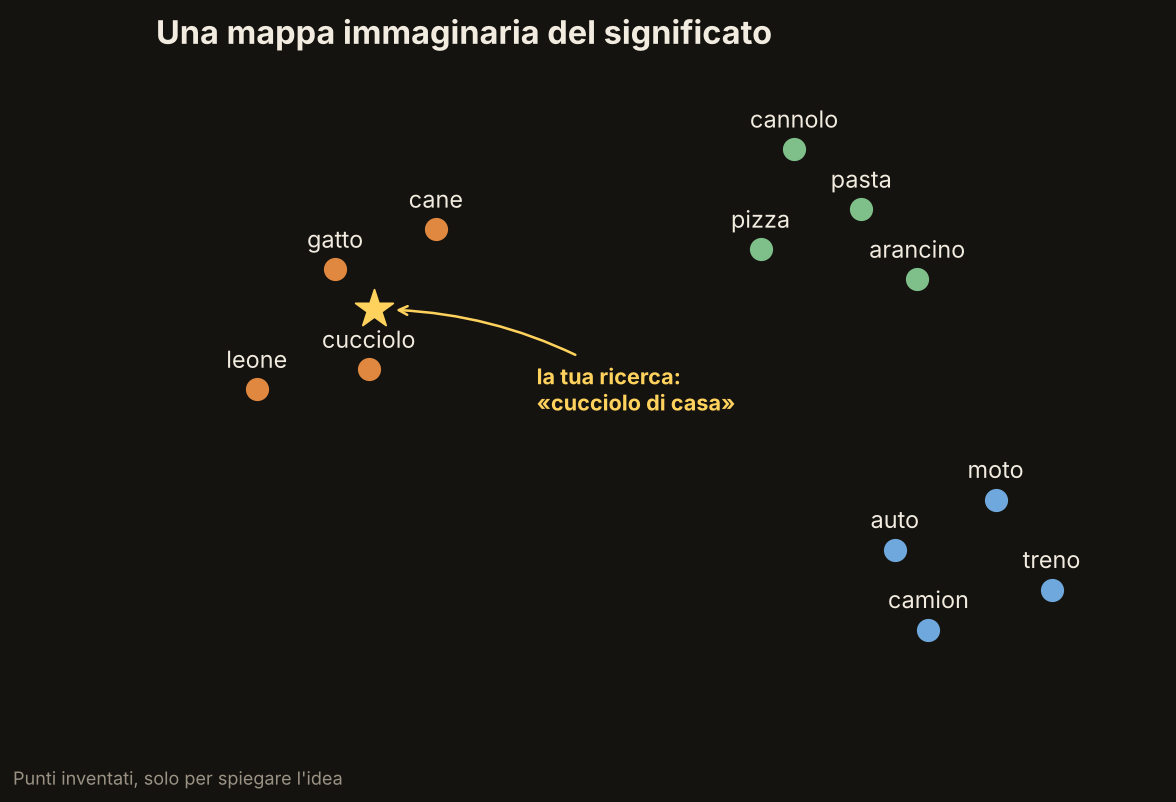
The easiest way to picture it is a map. Every sentence, every word, every document becomes a point on the map. And there is one rule: things that mean similar things end up close together.
"Cat", "dog" and "puppy" live in the same neighbourhood. "Car", "bike" and "truck" in another. "Pizza", "pasta" and "cannoli" in a third. And your search "house puppy", even though it does not contain the word "dog", lands right in the animals' neighbourhood.
One important note: real models do not use a flat map with two coordinates, but hundreds or thousands of numbers for each text. It is like a map with many dimensions, impossible to draw, but the idea is the same: closeness means similarity of meaning.
Searching becomes measuring distances
From here, searching is surprisingly simple:
1. The text you search for also becomes a point on the map.
2. The database looks at which documents are closest to that point.
3. It shows you those, in order of closeness.
Back to the contracts: "how to cancel the rent" and "right of withdrawal with six months' notice" land very close, because they are about the same thing, even though they share no words.
Where pgvector comes in
pgvector is a free, open-source extension for PostgreSQL, one of the most widely used databases in the world. It adds two things:
- a new column type, to store vectors next to your other data;
- the tools to find the nearest ones to a point, and indexes to do it fast even with many documents.
The advantage is practical: you do not need a separate database or one more service to run. Vectors live in the same database where you already keep users, documents and permissions. And a single query can say, for example: "find me the documents most similar to this one, but only this customer's".
What you can do with it
- Search by meaning across a company's or a firm's documents.
- "Documents similar to this one", like the suggestions on an article site.
- Assistants that answer questions about your files: they first find the passages that fit the question, then hand them to a language model that writes the answer.
- Spotting duplicates or near-duplicates in an archive.
The limits, honestly
- It depends on the model. Vectors are produced by an AI model: if you change it, all of them must be regenerated.
- It does not replace word search. For an invoice number or an exact surname, classic search is still better. The two together work better than either alone: we will come back to that in a later part.
- "Similar" does not mean "true". It finds what resembles the question; it does not guarantee that it is the right answer.
Where I used it
Semantic search with pgvector is one of the guided projects in my book Building a Document Management System: a document management system built chapter by chapter with Django 6.1, HTMX and pgvector. If you want to see how it is done from start to finish, here is the book's page: Building a Document Management System.
Next part
In part two we get our hands on the code: PostgreSQL with Docker, the pgvector extension and the first vector field in a Django project. Step by step, taking nothing for granted.